A guide to the prompt-writing advice that Anthropic, OpenAI, and Google's official docs share: six ingredients (goal, role, background, material, format, examples), where to put long material, how many examples to use, breaking work into steps, checking results, and a ready-to-use template.
This guide was put together on Oct 13, 2026, from the official prompt-writing documentation of Anthropic, OpenAI, and Google. It focuses on advice the three companies share; their model-specific recommendations may change as models change.
What does writing a good prompt actually mean?
A prompt is a work order you hand to an AI. A good prompt is not a magic incantation. It is closer to a brief that a new colleague could read and understand what to do, why, and how.
Anthropic's documentation suggests thinking of the AI as a brilliant new employee who doesn't yet know how your team works. It also offers a simple test: show your prompt to a colleague with little background and ask them to follow it. If they would be confused, the AI will be too.
In the end, writing better prompts comes down to three things: fill in the missing information, define what the result should look like, and check the result and refine.
The six ingredients of a good prompt
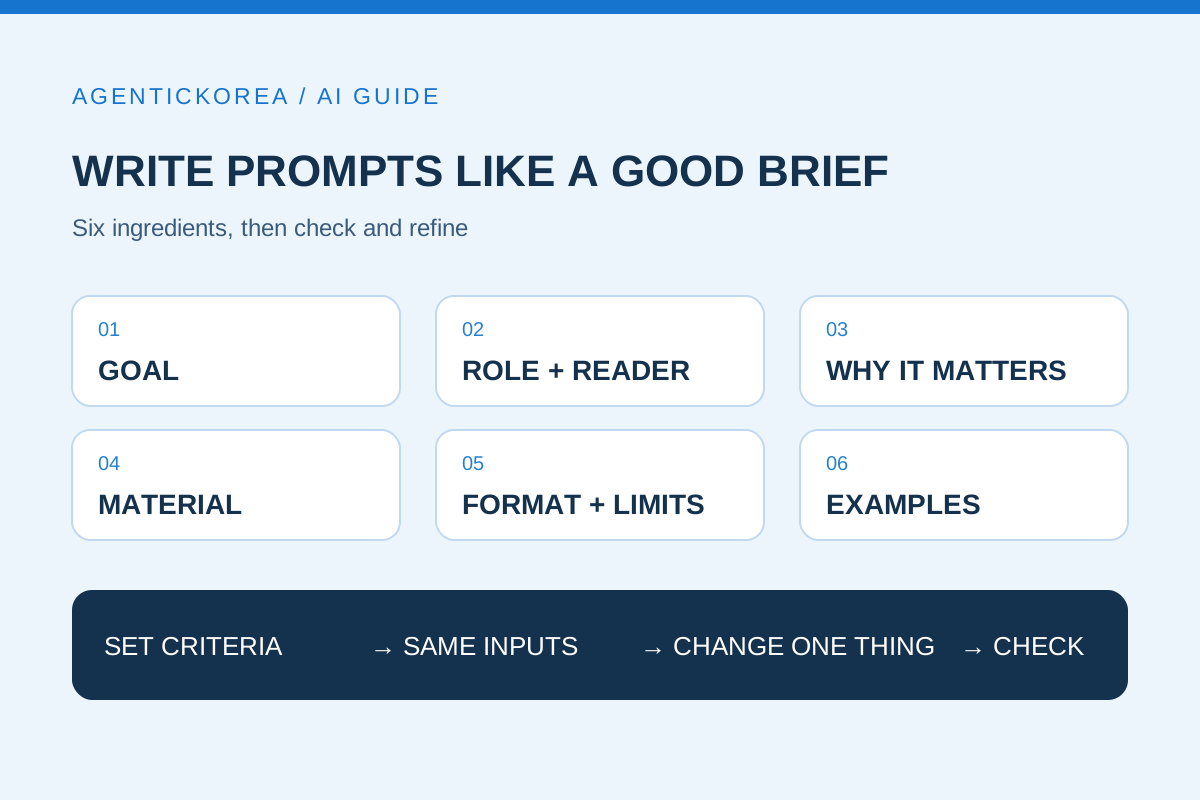
Compare the three companies' guides and the same ingredients keep coming up. You don't need all six in every prompt, but they make a good checklist when results miss the mark.
• Goal: State in one sentence what should be produced or decided. "Make a summary I can present in three minutes at tomorrow's meeting" beats "Summarize this."
• Role and audience: Say whose perspective to take and who will read the result. Anthropic notes that even a one-sentence role changes the focus and tone of the answer.
• Background and reasons: Explain why a condition matters. Anthropic's example: rather than just "never use ellipses," say the text will be read aloud by a text-to-speech engine that can't pronounce them, so the AI can generalize to similar cases.
• Material: Include your own material the AI can't know about (documents, tables, earlier conversations, policies). Google's guide likewise says reference material leads to specific rather than generic answers.
• Format and constraints: Set the length, the shape (list, table, paragraphs), conditions that must be met, and things to avoid.
• Examples: Show a sample of the result you want. It is one of the most reliable ways to match format and tone.
A before-and-after comparison
Here is a hypothetical example for illustration. Say you ask for a notice for your company blog.
• Before: "Write a Chuseok holiday shipping notice." (Chuseok is Korea's autumn harvest holiday.)
• After: "Write a Chuseok holiday shipping notice for customers of an online store. What customers most want to know is the last shipping date and the date shipping resumes. Use only the schedule below and don't invent any dates that aren't in it. Write one title line, a body of five sentences or fewer, and one final line on how to contact us. Keep the tone polite but not stiff."
The revised prompt includes the audience (customers), the goal (last shipping date and restart date), the scope of material, the format (title, five sentences, contact line), and the tone. That is why, even with the same AI, you end up making fewer rounds of corrections.
With long material, put the material first and the question last
When you include long material such as contracts, reports, or meeting notes, placement matters.
• Material first, question and instructions last: Anthropic's documentation says that placing long material near the top and the question at the end improved response quality by up to 30 percent in its tests, especially with multiple documents (checked Oct 13, 2026). Google also advises putting long context before instructions.
• Separate material from instructions: Mark where each document starts and ends. OpenAI's and Anthropic's guides recommend XML tags or Markdown headings to divide sections. If that feels technical, plain labels like "[Material 1: meeting notes]" and "[End of material]" work too.
• Have it pull evidence first: For long-document tasks, Anthropic suggests asking the AI to quote the relevant parts first and then answer based on those quotes. This also makes it easier to check whether the answer actually came from your material.
If you're curious how an AI can look up your own documents, read What is RAG? How AI looks up your documents before answering as well.
Say "do this" instead of "don't do that"
A list of prohibitions makes it hard for the AI to know what it should do. Anthropic's guide recommends describing what you want, for example "write in smoothly flowing paragraphs" instead of "don't use Markdown."
• Instead of "no jargon," say "write so a middle school student could understand."
• Instead of "don't write too much," say "keep it to three sentences."
• Instead of "don't include wrong information," say "mark anything you can't confirm from the material as needs checking."
Anthropic also explains that the style of your prompt influences the style of the answer. If you want less Markdown in the response, using less Markdown in the prompt helps.
How many examples, and how to include them
Including examples is called few-shot prompting. All three companies stress how well examples work, with some conditions.
• How many: Anthropic recommends three to five. Google recommends including examples but cautions that too many can make the model overfit to them.
• Make them varied: If all your examples look alike, the AI will copy patterns you didn't intend. Mix short cases, long cases, and edge cases.
• Keep the format consistent: Examples with mixed formats confuse the AI. Separate examples from instructions with clear markers.
Break big jobs into steps
If you ask for research, analysis, report writing, and a summary all at once, the middle steps tend to get fuzzy. Google's guide recommends one prompt per instruction, or chaining steps so each output feeds the next. Anthropic also advises writing order-sensitive tasks as numbered steps.
• Step 1: Pull only the key facts from the material as a list
• Step 2: Check the facts yourself and remove anything wrong
• Step 3: Write a draft report from the confirmed facts
• Step 4: Check the draft against criteria you set in advance
Adding a human checkpoint in the middle keeps errors from spreading into later steps.
How to check results and refine
Prompts are rarely right the first time. Anthropic's documentation says to define success criteria and a way to test against them before refining a prompt, and OpenAI's recommends using evaluations (evals) to compare results before and after you change a prompt or model. For everyday work, you can apply this simply.
• Set criteria first: Write down two to four checkable criteria, such as "dates match the material," "five sentences or fewer," and "no jargon."
• Compare with the same inputs: Pick three to five inputs you actually use often, and each time you change the prompt, compare results on those same inputs.
• Change one thing at a time: In my view, if you change several parts at once, it's hard to tell what made the difference. Test adding material, specifying format, and adding examples one by one.
• Spot problems prompts can't fix: Anthropic notes that issues like speed and cost can sometimes be solved more easily by choosing a different model. I covered how to choose in How to choose a Claude model.
• Check facts against the source: Even a well-written prompt can produce answers with mistakes. Compare numbers, dates, names, and laws or policies against the original.
A prompt template you can use right away
Fill in the blanks in this order and it will work for most work requests. Delete any parts you don't need.
• [Material] Paste the documents or data to reference and label them Material 1, Material 2, and so on.
• [Role and audience] You are a ___ specialist, and the result will be read by ___.
• [Goal] I want to use this result to ___.
• [Background and reasons] This condition matters because ___.
• [Steps] 1) Find the relevant parts of the material 2) Organize ___ 3) Write the result
• [Format and constraints] Length, shape (list, table, paragraphs), tone, and mark anything not in the material as "needs checking."
• [Examples] One to three samples of the result you want.
If you'd like request examples tailored to a real task, see Example requests for asking AI to set up domain email. To learn step by step, follow the learning guide in order.
Summary
Writing good prompts isn't about memorizing special phrases. It's about handing over the goal, background, material, format, and examples as you would to a new colleague, then checking the result against criteria you set and refining one thing at a time. Today, pick one request you make often, rewrite it with the template above, and compare the before and after results against the same criteria.
Sources
Anthropic — Prompting best practices (checked Oct 13, 2026) ↗
Anthropic — Prompt engineering overview (checked Oct 13, 2026) ↗
OpenAI — Prompt engineering guide (checked Oct 13, 2026) ↗
Google — Gemini API Prompt design strategies (updated Sep 17, 2026) ↗