RAG (Retrieval-Augmented Generation) lets an AI find and read relevant material before answering, then base its answer on that evidence. This guide covers the five steps, when you actually need RAG, what drives retrieval quality and a checklist for verifying answers.
This is a concept explainer written on Oct 12, 2026 after checking official documentation and the original paper. Service settings and prices can change, so check each provider's documentation again before you build anything.
RAG in one sentence
RAG (Retrieval-Augmented Generation) is a method in which an AI first looks up relevant material and then writes its answer based on that material.
An exam analogy helps. A typical chatbot is like a closed-book exam: it answers only from what it memorized. RAG is like an open-book exam: the model brings a reference book into the room, opens the pages related to the question, and then writes the answer. The better the book and the more precisely it finds the right page, the better the answer.
The name became widely used after the 2020 paper "Retrieval-Augmented Generation for Knowledge-Intensive NLP Tasks" by Patrick Lewis and colleagues. The paper proposed combining knowledge a language model stores through training (parametric memory) with an index of Wikipedia passages converted into vectors (non-parametric memory).
Why it matters: what a language model cannot know on its own
As explained in What Is a Local LLM?, an LLM generates text by predicting what comes next from context. That design leaves three structural gaps.
• Information after training: the model does not know what happened after its training ended.
• Your own material: it has never seen unpublished documents such as company policies, product manuals or your notes.
• Showing evidence: when it answers from memory, it is hard to show which part of which document the answer came from.
RAG fills these gaps by handing the model the material it needs at the moment of the question instead of retraining it. Because you only update the documents, it suits content that changes often.
How RAG works
Implementations differ by service, but the basic flow is similar.
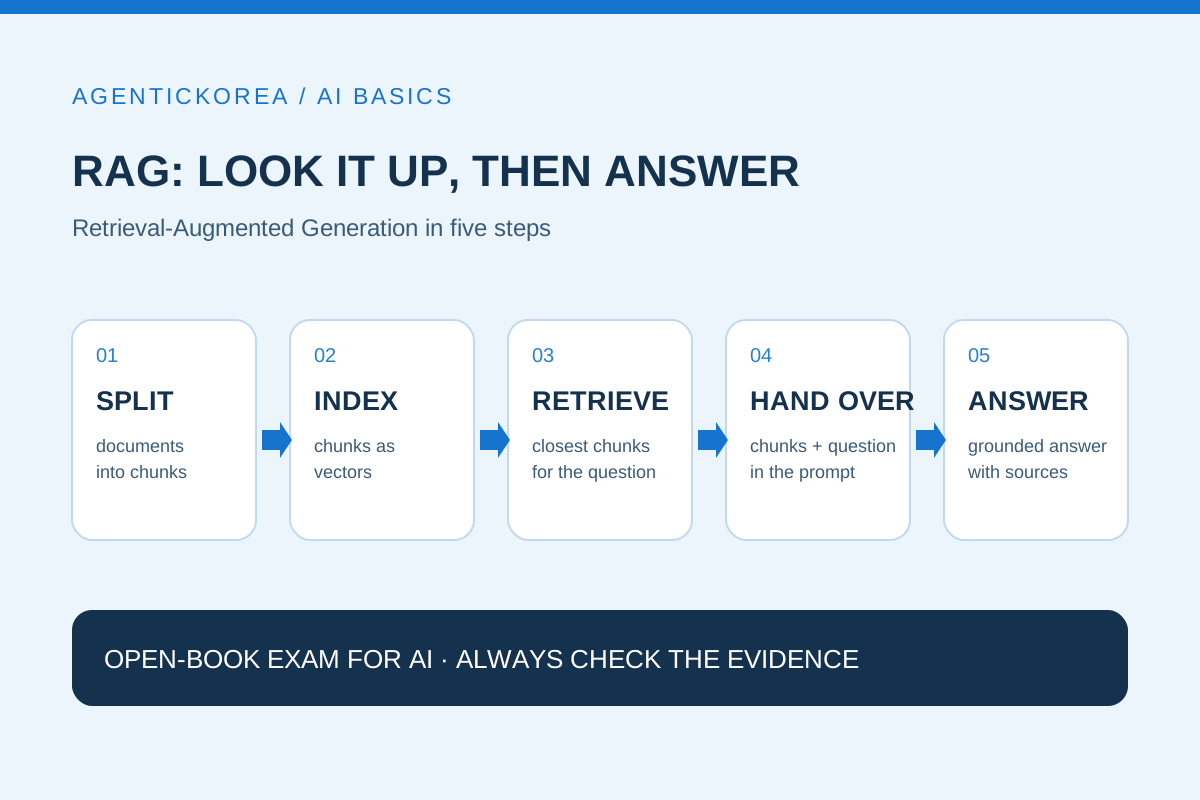
• Step 1, split: break documents into small pieces (chunks) of a few hundred tokens. Chunks sometimes overlap.
• Step 2, index: turn each chunk into a list of numbers (a vector) with an embedding model and store it in a vector store. Sentences with similar meanings end up as nearby vectors.
• Step 3, retrieve: when a question arrives, convert it into a vector too and find the closest chunks.
• Step 4, hand over: put the retrieved chunks into the prompt with the question. Example: "Answer only from the material below, and say you don't know if it is not there."
• Step 5, answer: the model reads the material, writes the answer and, ideally, shows which chunks it used.
For example, OpenAI's vector store documentation says files added to a store are automatically chunked, embedded and indexed, with a default chunk size of 800 tokens and an overlap of 400 tokens (checked Oct 12, 2026). Whether you build it yourself or use a built-in feature, these five steps happen under the hood.
Do you need RAG? How to decide
RAG is not always the answer. Think about it case by case.
• Little material: put it all in. Anthropic suggests that if your knowledge base is under about 200,000 tokens (roughly 500 pages), you first consider including the whole thing in the prompt without RAG.
• Lots of material that changes often: use RAG. When documents keep growing or change every week, retrieving and handing them over is easier to maintain than retraining.
• Want a different tone or format: consider fine-tuning. Fine-tuning mostly changes how a model answers; for adding current facts, RAG is more direct.
• Public, current information: use web search. For news and public documents, a web search feature plays much the same role. RAG mainly targets material you own.
Three things that decide retrieval quality
When RAG gives a strange answer, the cause is often the retrieval step rather than the model. When you first build one, check these three things.
• Chunk size and boundaries: too small and context is cut off; too large and unrelated content slips in. Make sure tables or clauses are not split in the middle.
• Combine meaning search with keyword search: embeddings find sentences with similar meanings but can miss terms that must match exactly, such as error codes or product numbers. That is why hybrid search adds keyword-based ranking such as BM25.
• Reranking: retrieve a wide set of candidates first, reorder them by relevance to the question, and pass only the top few to the model.
In an experiment Anthropic published in September 2024, adding a short context description to each chunk (Contextual Retrieval) plus keyword search and reranking reduced the share of cases where relevant chunks were missing from the top 20 results from 5.7% to 1.9%. These numbers come from the company's own test conditions, so you should not assume the same result on your documents, but they clearly show that improving retrieval can change results a lot.
Example: an internal policy assistant
This is a hypothetical example for explanation. Imagine a 100-person company building a question assistant from 30 PDF policies on leave, business travel and expenses.
• Measure the size first. If everything is under 200,000 tokens, you can start by putting it all in without RAG.
• If there is more, split by policy clause and attach location labels to each chunk, such as "Expense policy > Travel > Lodging".
• Add a prompt rule: "Do not guess anything that is not in the policy documents; point the employee to the responsible team instead."
• Have every answer end with the name of the clause it relied on so employees can check the source right away.
• When a policy changes, keep the model as it is and re-index only the documents.
A checklist for verifying RAG answers
RAG gives you more grounded answers, but if it retrieves the wrong chunk it will deliver a wrong answer just as confidently. Check the following before using a result.
• Open the source chunk and confirm it actually answers the question.
• Look for numbers or conditions in the answer that are not in the material.
• Ask the same question in different words and see whether the same evidence comes back.
• Make sure old and new versions of a document are not indexed together.
• Confirm that documents containing personal data or requiring permissions are not mixed into the search scope.
Summary: RAG hands the AI a reference book
The core of RAG is not changing the model but choosing well what you hand to it. If the material is small, put it all in; if it grows, split it, retrieve it and hand it over; and always check answers against their evidence. To learn AI's structure step by step, continue with the AI Learning Guide.
Sources
Lewis et al. — Retrieval-Augmented Generation for Knowledge-Intensive NLP Tasks (arXiv, 2020) ↗
Anthropic — Introducing Contextual Retrieval (Sep 19, 2024) ↗
OpenAI — Retrieval and vector stores guide (checked Oct 12, 2026) ↗